Thank you page survey gone after the August 2026 upgrade?
Why Thank you page surveys stopped working after the August 26, 2026 upgrade, and how to add one back on a Basic, Shopify or Advanced plan.
Your survey stopped showing because your store moved to Shopify’s new Thank you and Order status pages, where the additional scripts and script-tag widgets that used to draw a survey no longer run. The deadline for non-Plus stores was August 26, 2026; stores that hadn’t upgraded by then were upgraded automatically. To get one back, install an app that offers a Thank you page app block, then add that block in the checkout and accounts editor.
What the August 26, 2026 deadline changed
August 26, 2026 was the deadline for stores on a non-Plus plan to upgrade their Thank you and Order status pages to the new versions. Stores that had not upgraded by that date were upgraded automatically. Stores on the Pause and Build plan are upgraded automatically too, and that upgrade is permanent after you unpause.
Upgrading replaces the pages. Your existing Thank you and Order status pages, and any customizations on them, are replaced with the new versions of those pages. A survey that lived in a script had nowhere left to run.
The new pages are customized in the checkout and accounts editor, reached from Settings › Checkout. It is separate from your theme editor. Content on these pages now comes from app blocks. An app block is a piece of an app’s content that you place on a page in that editor. It replaces the old script-injected widget.
Why scripts and script-tag widgets stopped running
- Additional scripts are not supported on the new Thank you and Order status pages. Those scripts covered tracking and page customizations alike, so a survey drawn by a script stopped appearing.
- The additional scripts box in your checkout settings has been view-only since August 28, 2025, so you cannot edit the code there. You also cannot reactivate a script once your pages have completed the upgrade.
- Script tags stopped running. A script tag is code an app asks Shopify to inject into a page. Tags scoped to the Order status page, or to all pages, stopped running for non-Plus stores on August 26, 2026, and apps have not been able to create them since February 1, 2025.
Shopify splits the replacements in two. Visible content becomes app blocks, added in the checkout and accounts editor. Tracking becomes an app pixel or a custom pixel, managed in the Customer events section of your admin. What replaces additional scripts maps each old use to its replacement. A pixel is a script that watches shopper behavior and sends events to a third party, and it runs under Shopify’s consent rules rather than being pasted into a page.
How to tell what happened to your store
- Go to Settings › Checkout and look at the Configurations section. If an upgrade notice displays, your store is still on the deprecated pages. If no notice displays, the upgrade already happened.
- Open your upgrade guide. Click Review in the upgrade notice. Shopify generates it for your store and lists what was on the old pages.
- Check the Apps section, which lists apps the developer has updated. Under Tracking and analytics, click Manage to set up app pixel tracking. Under Page customizations, click Add blocks to recreate visible content.
- Check Incompatible apps, which lists apps under Custom apps and Apps that require update from a developer. Shopify’s guidance is to contact the developer or install an alternate app.
- In the checkout and accounts editor, open the Apps sidebar and check the Added tab. It lists every block you have placed and the pages each one is on. A survey app can be installed and working but never added to the Thank you page, which looks the same as a broken survey.
How to get a survey back
What Shopify’s own free apps can do
Checkout Blocks is Shopify’s free app for these pages. On a Basic plan or higher you get its dynamic content and static content blocks, and you can place them only on the Thank you and Order status pages. Every other Checkout Blocks feature is Shopify Plus only. The static content block adds text or a banner, with basic Markdown and Liquid personalization variables such as {{ customer.firstName }}. There is nothing for a customer to fill in, so it cannot collect survey answers.
Shopify Forms can collect survey-style answers. Its field types include single-line text, multi-line text, dropdown list, radio buttons, multiple choice, date, number and file upload, and a form can hold up to 31 fields. But Forms places forms in your theme, not in checkout. A popup form needs the Forms theme app embed turned on in your theme and displays on all pages or on page types such as collection or product pages. An inline form needs a compatible theme and the Forms theme app embed turned on, and goes on a new landing page or an existing page template. The Thank you page is not a theme template, so Shopify Forms cannot put a survey there.
A survey app with a Thank you page app block
This is the route that keeps the question on the page customers see right after paying. Apps built with UI extensions for the Thank you and Order status pages work on the Basic Shopify plan and higher. Apps that customize the information, shipping and payment pages of checkout are Shopify Plus only, so check that a survey app targets the Thank you page and not the checkout steps.
In the Shopify App Store, search a keyword such as post-purchase survey, then click Refine › Customizes checkout › Apply to narrow the results.
To add the block:
- Go to Settings › Checkout.
- In the Configurations section, click Edit next to the configuration you want to customize. (The Shopify mobile app calls this button Customize.)
- In the page selector at the top, choose Thank you.
- Click ⊕ Add block in the section you want, from the Sections sidebar. Or open the Apps sidebar, click ⊕ next to the block, then choose Thank you in the Add to pop-out.
- Click the block to set its questions.
- Click Save.
- Blocks are added one page at a time, so if the app supports it, choose Order status in the page selector and add the block there too.
Two limits are worth knowing: a maximum of 3 apps per highlighted area, and a simulated editor where you cannot place orders. Test with a real order in your storefront.
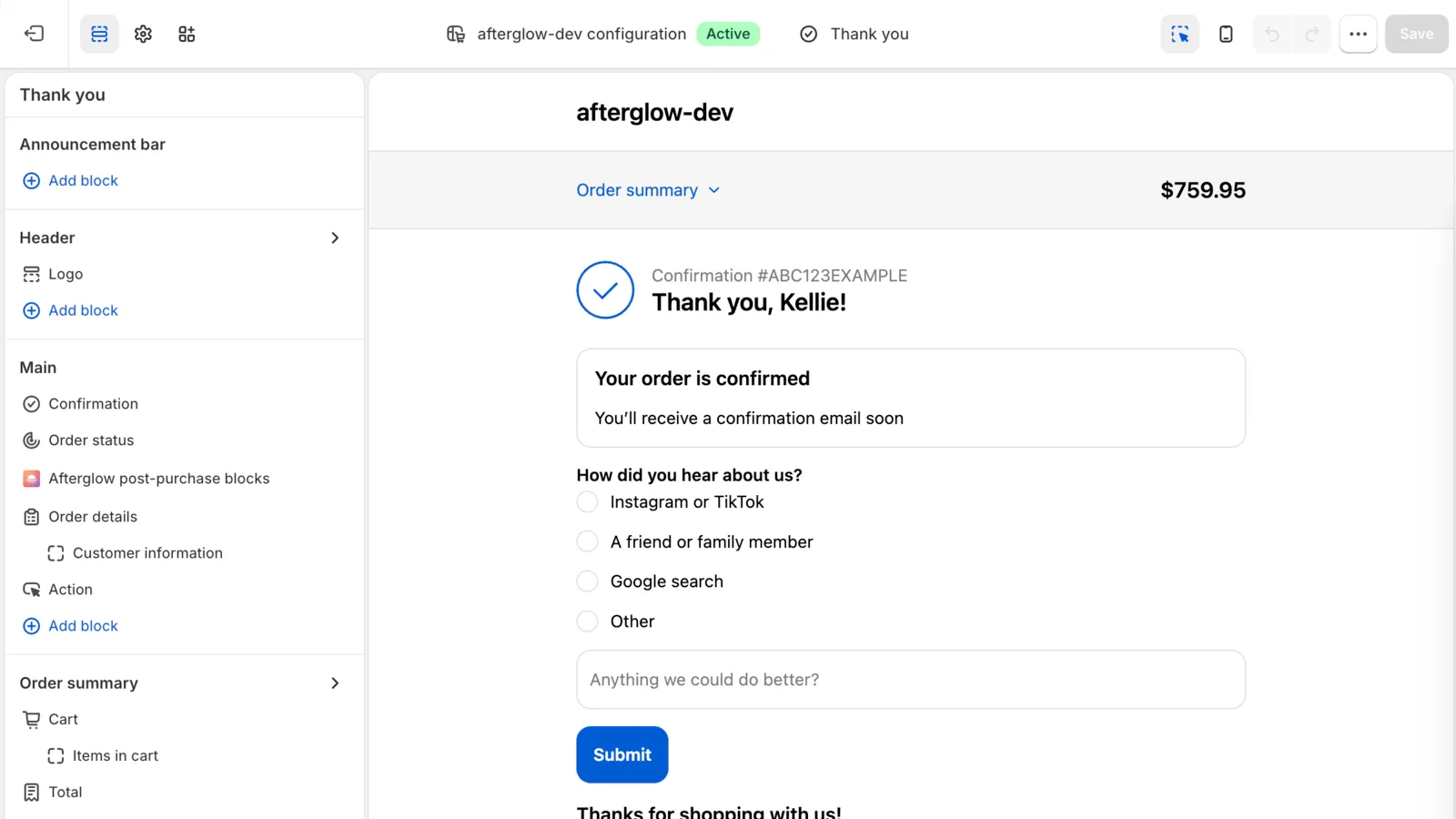
Building it yourself
Shopify lists survey requests as a use case for Thank you page UI extensions and publishes a tutorial, Add a survey to Thank you and Order status pages. It builds one extension with two targets, purchase.thank-you.block.render and customer-account.order-status.block.render, and needs app development permissions, a dev store and Shopify CLI.
Doing this with Afterglow
Afterglow’s survey block is on the Free plan, which collects up to 100 responses a month. A question is either Short text or Multiple choice, a survey holds up to 5 questions, and a multiple-choice question takes up to 7 options, entered one per line. It needs at least 2 options, or the question is shown as short text instead. A shopper picks one option. Answers are stored with the order name and export as CSV from the responses page, one column per question plus Submitted at, Order and Customer ID.
Afterglow uses Shopify’s app blocks on both pages, with no script tags and no theme edits, so the August 2026 change doesn’t affect it. Afterglow asks Shopify to place its Thank you block when you install the app, so it may already be on the page. The step-by-step, including adding the Order status block and testing with a real order, is in add blocks to the Thank you and Order status pages.
One limit to know before you plan around it: the survey shows on the Thank you page only. The Order status extension renders nothing for it, so a customer who comes back later through the link in their confirmation email never sees the question.
When a Free store reaches 100 responses in a month, the survey is hidden from the Thank you page until the count resets on the first day of the next month, UTC. Starter is $9 a month for unlimited survey responses, Growth is $29 and adds order tracking, and Pro is $49 and adds referral discount codes. Paid plans have a 14-day free trial.
Sources
- Upgrading and replacing your Thank you and Order status pages (Shopify Help Center), checked October 11, 2026
- Non-Plus - Upgrading and replacing your Thank you and Order status pages (Shopify Help Center), checked October 11, 2026
- Reviewing and replacing additional scripts on your Thank you and Order status pages (Shopify Help Center), checked October 11, 2026
- Customizing your checkout and customer accounts with apps (Shopify Help Center), checked October 11, 2026
- Using the checkout and accounts editor (Shopify Help Center), checked October 11, 2026
- Checkout Blocks app (Shopify Help Center), checked October 11, 2026
- Static content blocks (Shopify Help Center), checked October 11, 2026
- Create forms (Shopify Help Center), checked October 11, 2026
- Inline form settings (Shopify Help Center), checked October 11, 2026
- Popup form settings (Shopify Help Center), checked October 11, 2026
- Settings for both popup and inline forms (Shopify Help Center), checked October 11, 2026
- Pixels and customer events (Shopify Help Center), checked October 11, 2026
- Order status script tags (shopify.dev), checked October 11, 2026
- About Thank you and Order status page customization (shopify.dev), checked October 11, 2026
- Add a survey to Thank you and Order status pages (shopify.dev), checked October 11, 2026